Great Innovations — Crowdfunding with Innovocracy

I'm a huge fan of crowdfunding, and recently wrote a 3-part series on the IBM Social Business Insights blog that I'm in the process of reposting here on my blog (Part 1). But I'm so impressed with this crowdfunding site, innovacracy.org, and at least one of the projects on it, that I wanted to give it a special shout out.

According to the website, the idea behind Innovocracy is bridging the gap between ideas and reality in academic research:

"Both pure and applied research often reveal potential products and services that can have a positive impact on society. But taking that research and developing it into working prototypes or demonstrating a proof of concept can be challenging. In the academic environment finding the funds to build out and test ideas with commercial applications is often a challenge. Yet finding those funds can unlock the potential of the millions of dollars and thousands of hours spent on research programs. Innovocracy was created to bridge the gap between powerful ideas and beneficial applications of those ideas. We offer a funding source that connects people who want to support innovation in academic research and those innovators found on campuses around the world."

The innovation that really caught my attention is the Web-Based Volunteer Support Network for Blind and Low Vision People.

Screenshot of VizWiz in action.
The captioning reads: iPhone: Double tap the screen to take a photo.
Double tap again to post card and start asking question.
The basic concept is a wonderful example of crowdsourcing at its best. VizWiz is an iPhone application that blind people can use to answer visual questions in their everyday lives. Users simply take a picture and speak a question they’d like to know about it, and their questions are answered by people out on the web, usually in under a minute and all for free.

VizWiz logo
It was released to the Apple® App Store a little over a year ago, and has been a booming success with more than 5,000 users asking over 50,000 questions. So successful in fact with both users and potential volunteers that the current setup is unsustainable and the creator, Jeffrey Bigham, PhD, from the University of Rochester, is looking for $5,500 by September 14th to expand the service by creating a web site hub and answering center.


Repost from IBM Social Business Insights: Crowdfunding: Fundraising with a Social Twist


IBM Social Business Insights Blog logo
IBM Redbooks thought leader logoEarlier this year I started blogging for the IBM Social Business Insights blog as part of a team of IBM Redbook Thought Leaders. I'll be reposting those blog posts here on my personal blog. Crowdfunding: Harnessing the power of social networking to raise money (Part 1 of 3)  was originally published on June 12, 2012, and is owned by IBM.
I recommend checking out the IBM Social Business Insights blog for some compelling and though-provoking content. 


Crowdfunding: Harnessing the power of social networking to raise money (Part 1 of 3)


By Holly Nielsen, Social Media Manager and Webmaster, Human Ability and Accessibility

I’m fascinated with the power and reach of social networking. Every day I find something new – another clever idea of capitalizing on the power of all of these connected people who are online daily making new connections, sharing content, collaborating… It truly is a new world of interacting with others, and in many ways makes our huge world of seven billion residents feel a little smaller and much friendlier.

One of the social networking areas that’s captured my attention recently is crowdfunding, an offshoot of crowdsourcing. Oxford Dictionaries even has an official definition of crowdfunding:

The practice of funding a project or venture by raising many small amounts of money from a large number of people, typically via the Internet.

Crowdfunding is being used successfully by many types of people and groups for a broad range of projects and causes including creative projects, entrepreneurial products or technologies, artists, bands, or independent filmmakers seeking support, humanitarian aid, political campaigns, charities, and microlending.

Crowdfunding creative projects
I’m fascinated with three-year old Kickstarter – a platform that enables potential entrepreneurs with a creative idea to float the idea within the Kickstarter community to see if the people like the idea enough to fund it; lowering the barrier to entry dramatically. When you think about it, what an inexpensive (as in free) means to do market research and build your customer base, in one fell swoop.

Kickstarter logoThe Kickstarter project funding categories are broad and range from art, to food, to publishing, technology, and theater. The average project is raising under $10,000, but take a look at the Most Funded page for a list of successfully funded projects and how much they received (one of them was 15,454% funded for a total of $77,271 pledged!) 

Only 44% of the projects meet their financing goal, and a project that doesn’t meet its goal receives no money that is, if the project doesn’t meet its funding goal, the supporters get their money back, so it’s a no-risk funding situation. But if you look at Kickstarter’s FAQs, it does talk about accountability, and do not take responsibility for the project creator completing the project after the money is handed over. It’s up to the donor to check out the project and creator thoroughly. The FAQ points out that “Because projects are usually funded by the friends, fans, and communities around its creator, there are powerful social forces that keep creators accountable.”

According to the website, more than $200 million for 20,000 projects has been raised. Kickstarter takes a cut, 5%, but only if the project is fully funded. In contrast to traditional venture capital funding, the project owners keep 100% ownership of their work.

Like all truly integrated social networking applications, Kickstarter is tied into all of the major social media channels, giving the project owners an easy way to promote their projects through their online and offline communities.

So what do investors get for their most popular pledge of $25 or average pledge of $70? There’s no tax write-off or ownership of the project, but the project creators offer rewards, related to the project itself. According to Kickstarter, here are the four most popular types of rewards with examples:
  • Copies of the item: The album, the DVD, a print from the show. These items should be priced what they would cost in a retail environment.
  • Creative collaborations: A backer appears as a hero in the comic, everyone gets painted into the mural, two backers do the handclaps for track 3.
  • Creative experiences: A visit to the set, a phone call from the author, dinner with the cast, a concert in your backyard.
  • Creative mementos: Polaroids sent from location, thanks in the credits, meaningful tokens that tell a story.
Projects with creative and tangible products are the most likely ones to get funded.

Stay tuned for part 2 to find out about how non-US residents can crowdfund their creative projects.


Video Mania: Resistance is Futile

Some days I'm not sure what's going to take over our brains and world first:
  • inspiring and uplifting quotes Photoshopped onto photos of beautiful scenery or cute animals and kids
or
  • funny videos
Today I'm voting for videos to take first place for world and cerebral domination — have you seen the latest YouTube statistics?
  • 72 hours of video are uploaded to YouTube every minute
  • Over 800 million unique users visit YouTube each month
  • Over 3 billion hours of video are watched each month on YouTube
  • In 2011, YouTube had more than 1 trillion views or almost 140 views for every person on Earth
 Regardless of your sense of humor ironic, wacky, snarky, slapstick, dark it's guaranteed you can find a video that will make you laugh. (A slight detour here an interesting article that actually spells out 10 different humor types in dating profiles.)

Here are two videos that grabbed my attention today, and tickled my funny bone, as the old saying goes.

The first one is fiendishly clever. Clemenger BBDO created a vending machine to test how far humans will go to get a free snack. And the resulting video is somewhere between a evil, mad-scientist-type experiment run amok and impromptu performance art.


The second video that had me laughing out loud is this (scripted but still funny) video of two men who attempt and fail miserably to resist singing along with the annoyingly catchy Gotye song, "Somebody That You Used to Know". Come on, don't deny it you sing it in the car too. :-)


So what type of humor and videos make you laugh out loud all by yourself, or are so perfect that you share them with all of your social networks?

Repost from IBM Social Business Insights: Five new social networking applications: Cool or creepy?

Earlier this year I started blogging for the IBM Social Business Insights blog as part of a team of IBM Redbook Thought Leaders. I'll be reposting those blog posts here on my personal blog.
Five new social networking applications: Cool or creepy?
  was co-written with my talented colleague, Brandi Boatner, and originally published on April 17, 2012, and is owned by IBM.
I recommend checking out the IBM Social Business Insights blog for some compelling and though-provoking content. 


Five new social networking applications: Cool or creepy?
By Brandi Boatner, IBM Global Business Services
and Holly Nielsen, Human Ability and Accessibility

The different ways social networking can connect people is constantly expanding, with new applications announced daily. There are so many new ideas and technologies, that privacy laws can’t begin to keep up with the various ways of seamlessly sharing your online data and preferences.

For instance, most people are familiar with the most popular geo-location applications such as Foursquare and Google Places, where users can check in when they’ve arrived at a new destination, and notify their networks of their latest location. Below is a list of five new applications that beg the question: Are these cool or creepy?

  1. In late February, KLM Royal Dutch Airlines announced they were introducing a new program called “Meet and Seat,” enabling passengers, through either their Facebook or LinkedIn profile, to not only select their seat on the plane, but to select their flight seatmates. KLM is looking to improve the entire customer experience by including this mechanism for travelers going to the same conference or convention to self-connect. And taking it even further, KLM is encouraging seatmates to meet before the flight for coffee in the terminal or perhaps even sharing a taxi at their new destination.

    Cool/creepy factor: For a single person, this could feel like a speed date that continues hours past the normal five-minute limit, with little hope of escape. For someone looking to network with potential partners, employers, and so on, this could be a great opportunity.

  1. After you sign up for an application called Tripl, a new social travel service, you can interact with recommended locals and travelers connected to your existing network. You and your friends can recommend “must meet” locals on your trips. When you add your trip plans, you can find out who – local and traveler – will be at your destination. And locals are notified when other Tripl members are visiting.

    Cool/creepy factor: It really depends on your network doesn’t it? If members are vetted, you might feel comfortable meeting a visiting member for coffee, or contacting a local when you reach their city, but if not, then what?
  1. Fashism is a web and smartphone app that lets community members give and receive real-time feedback on photos of outfits with a love it or leave it voting and comment feature. Editor-selected accessories are available for purchase from within the app.

    Cool/creepy factor: Pretty cool, actually. It would be a lot of trouble for someone to join just to make snarky comments about random people’s outfits, so it seems like a decent way to put together great outfits for the fashionistas among us.

  1. According to the website, Highlight gives you a sixth sense about the world around you, showing you hidden connections and making your day more fun. If someone standing near you also has Highlight, their profile will show up on your phone.
As you go about your day, Highlight runs quietly in the background, surfacing information about the people around you (up to a football-field length away). If your friends are nearby, it will notify you. If someone interesting crosses your path, it will tell you more about them.
You can see their name, photos of them, mutual friends, and anything else they have chosen to share. When you meet someone, Highlight helps you see what you have in common with them. And when you forget their name at a party a week later, Highlight can help you remember it.
Cool/creepy factor: Highlight does have the promise of making people-watching fun by allowing you to get information about those you watch, however, who is watching you? Do you want a stranger on the street to know so much about you; or are strangers just friends we haven’t met yet?

  1. Pair is a social app for couples; it lets you communicate with one other person – ideally a spouse or romantic partner. Upon signing up, you provide an email address for the person you want to pair with, and that person gets an invitation to the service. You can unpair whenever you want, but you can’t pair with more than one person at a time.

    The main section of the app is a single stream of communication between you and your loved one, with pictures, video, and shared locations posted directly on the timeline. When both partners are online, the app becomes like a chat program, letting you know when the other person is typing, and lighting up a button at the top of the screen that lets you initiate a Facetime conversation.

    Cool/creepy factor
    : This too is actually cool especially for those who find themselves in a long-distance relationship, given the current economy and state of employment for many. Pair is unlike Facebook and Twitter; it’s inherently not a place for narcissism. Anything you were going to brag about –such as a promotion or well-crafted meal – is merely conversation when it’s between you and a close companion. There’s no social pressure with pandering for Likes or Retweets.

The proliferation of smart phones and the social networking explosion have created new and uncharted opportunities for expanding our social networks and meeting people in ways unheard of even five years ago, as our survey of new apps has shown us.

Arguably, each of these apps potentially has factors of coolness and creepiness, depending on who is using the application, and why. Seamless data sharing means that we no longer have to give applications permission to use our public data. It’s a reminder to us all that we’re responsible for regularly checking and managing our privacy settings on our social networking sites and applications.

Free images from FreeDigitalPhotos.net

Twitter's New Strategy: Serving Up What They Think Is Relevant to Me

I got this new now-weekly email today from Twitter. If you have a Twitter account, you probably received one also, which looks similar to mine. Note: This is a longggg graphic — there's more blog content below it, so don't give up quite yet.)


Twitter has quickly jumped on pushing their recent purchase of Summify into Twitter production in record time. (Summify was a start up social news aggregator that collected news from users' social networks and compiled it in daily emails.) According to Twitter's blog, they're delivering "The Best of Twitter" to my inbox.
If you glanced at my long, long graphic above, you can see that there are two parts to this new email, which are as follows, according to the Twitter blog: 
  • The first half is a "...summary [that] features the most relevant Tweets and stories shared by the people you’re connected to on Twitter."
  • The second half of the ginormous email "... features the most engaging Tweets seen by the people you follow, even if you don’t follow those who wrote them. You can see who from your network retweeted or favorited these Tweets and click “View details” to retweet, favorite, reply or view the conversation around them." 
And here's where I start to get uncomfortable. I was reminded of a Ted Talk video I watched late last year, and went digging for it, to see if I remembered correctly. And I did. Twitter's new summary doesn't prevent me from following specific tweeters and hashtags, but it seems to be the first step in becoming a gatekeeper by surfacing the content that the Twitter algorithms determine is relevant to me, and is yet another example of the "online 'filter bubbles'" that Eli Pariser talks about in his nine-minute TED Talk, that I've embedded below (and highly recommend you watch). TED summarizes the video this way, "As web companies strive to tailor their services (including news and search results) to our personal tastes, there's a dangerous unintended consequence: We get trapped in a "filter bubble" and don't get exposed to information that could challenge or broaden our worldview. Eli Pariser argues powerfully that this will ultimately prove to be bad for us and bad for democracy."

(A colleague and I tried the Google search experiment where we both searched on the same word, then compared what we found — and we did not get the same search results — so the online filter bubble is in play right now.)


 So in "summarizing" the stories and tweets sent to me in this weekly email, Twitter is perpetuating and embracing the "online filter bubble" that Eli Pariser talks about; deciding for me what is relevant to me, just by serving it up in a weekly email.  I subscribe to several social media aggregation emails — one of my favorites is from SmartBrief; but aggregating is what they do and it's what I expect of them.

All of this makes me wonder where we draw the line in this age of information overload, and how we choose between:
  • News customized to what you've looked at so far and the news and articles your social network is reading

    or
  • News that helps you stretch your mind and your opinions, and lets you step out of your clearly defined point of view to learn and decide on your own? 
So what do you think? Are they mutually exclusive? Do we have to choose one or the other? Or is there some way to make them both work?

Repost from IBM Social Business Insights: The Social Media Wars (Part 2 of 2)

Earlier this year I started blogging for the IBM Social Business Insights blog as part of a team of IBM Redbook Thought Leaders. I'll be reposting those blog posts here on my personal blog.
The Social Media Wars (Part 2 of 2)  was originally published on April 20, 2012, and is owned by IBM.
I recommend checking out the IBM Social Business Insights blog for some compelling and though-provoking content. 


The Social Media Wars (Part 2 of 2) 

By Holly Nielsen
Social Media Manager and Webmaster, Human Ability and Accessibility

In The Social Media Wars (Part 1 of 2) I defined the terms of social media, social networking and social business, reviewed why you might want to include social media channels in your marketing plan, and how to define your objective before you select a channel(s) and get started.

Here are my thoughts about the current top pros and cons of each of the Big Five (in alphabetical order) to help you decide which social media channel might best meet your needs.

Social media channel
Pros
Cons
  • Easy to create a business page.
  • Largest user base of 850,000+; over half log on daily.
  • Easy to upload photos and videos.
  • Easy to share relevant information from other pages and users with your audience.
  • Latest status update character limit is 63,206.
  • Mobile version available.
  • Can customize your URL when you have 25 followers.
  • Difficult to organically grow fan base without advertising or using additional promotional vehicles.
  • You must have a personal page to start a business page.
  • Circles are an elegant means to let you separate your different audiences and easily customize messages.
  • Easy to upload photos and videos.
  • Easy to share relevant information from other pages and users with your audience.
  • Mobile version available.
  • No customization of URLs
  • The majority of the users are male, a problem if your target audience is mostly female.
  • Users do not log into Google+ as frequently as they do to the other channels.
  • Groups are business oriented, and your audience is a professional one, since they’re all using it for professional networking.
  • Limited mobile app available.
  • Sharing links with other groups or individuals is supported.
  • Users do not log into LinkedIn as frequently as they do to the other channels.
  • No customization of URLs.
  • You must have a personal account to start a group.
  • No direct photo or video uploading.
  • Popular images (with links back to the original source) can get repinned on hundreds of other users' boards.
  • Pinning function makes it easy to share relevant information from other Pinterest users with your audience.
  • Limited mobile app available.
  • 80% of the users are female, which is a problem if your target audience is mostly male.
  • You can only pin photos and videos, so, if, for instance, your web content is text-based you’ll want to choose a representative (and compelling) image to enable participation.
  • You need to have a product set that translates easily to the Pinterest user base interests.
  • No customization of URLs.
  • Use of #hashtags makes it easy to extend your message beyond your existing followers.
  • Many third-party apps available to help you categorize your account, thus finding accounts to follow and add followers.
  •  Mobile version available.
  • Unique URL available.
  • Multiple third-party clients available. 
  • Retweet (RT) capability makes it easy to find and share relevant information from other Twitter users with your audience.

  • 140-character limit means your messages must be very brief, and depth of interaction is limited.
  • Profile information, called your bio, is also limited to 160 characters and a URL.
  • You need to repeat your tweets multiple times because there is so much content that it is easy for your followers to miss your tweets.


Some general rules apply across all of the social media channels and you must be prepared for them before you execute your social media plan:

  • All of the channels take significant resources to maintain, whether you trade off among staff or dedicate one person. One of the worst mistakes is to start an account or page, then neglect it. Your followers will drop off and not come back, a potentially paralyzing blow to a corporate brand.
  • Spend the time doing your competitive research. Which channels are your competitors using? Are they using them well? Could you do it better? 
  • There is no avoiding negative feedback. Professional naysayers, known as ”trolls,” are also a fact of life online. Consider social channels as a mechanism to address legitimate customer concerns promptly and publicly. Ultimately, resolving customer concerns in these highly visible public forums can improve overall customer loyalty and satisfaction. Acknowledge complaints immediately, even if you don’t have a resolution or you could become a case study in a blog like the one I wrote in January 2012, Preventing Customer Service Fumbles from Going Viral: A Social Media Cautionary Tale.

    When a troll tries to engage you, keep your responses professional and on topic. As a rule, if trolls can’t get the emotional reaction out of you that they’re seeking, they will eventually leave you alone and search for easier targets. If the interaction becomes profane, offensive, abusive, or continues for more than a couple of interactions, don’t hesitate to ban the troll and delete posts. Your followers don’t want to see that stuff either.

    Note: Arizona just passed a law against online trolling that is waiting for the governor’s signature. It’s not expected to hold up in a court challenge, but it does show that trolling is an annoyance, and unlikely to go away, so having a strategy to deal with them is the prudent thing to do.
  • Engage in conversation, be a resource for relevant, related content and build your community. If you do nothing but push your products and services, you’ll turn off your potential customers quickly. A good rule of thumb is to only mention your “stuff” every 10 posts, tweets, or pins.
  • My recommendation is start slowly. Pick one social media channel and work on building your following there, then add more channels as your bandwidth allows.
I manage social networking for IBM Accessibility, and for now, you’ll find us on Facebook, Twitter, and LinkedIn. At some point, we may increase our presence in additional channels, but we’re meeting our objectives with our activities in these three.

A few resources to get you started (I can hardly do this justice—so many talented and knowledgeable people are out there):

Readers, if I missed your favorite social media experts, please add them in the Comments section.
Thanks!


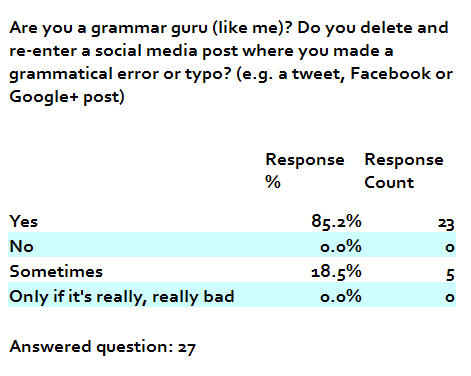
Are You a Grammar Guru Too?

Could you answer my one question survey? Thanks!
(I'll share the results in a future blog post.)

http://www.surveymonkey.com/s/2DRF2RJ

Okay, this was a statistically insignificant survey, but fun nonetheless to see that there are others like me, who will delete and repost to get rid of a typo or mistake, lol.
So whether you call yourself a grammar guru, grammar goddess, or grammar ninja, it's all the same.
Thanks for playing!