How to Extend Your Social Networks with Ease

I'm a social person—I fully admit it. As I've mentioned in my blog posts before: I love social—the connections, the collaboration, the exposure to new ideas. I'm transparent about my social savvy—my email auto-signature includes links to my LinkedIn and Twitter accounts, plus a link to my blog.

When I was coaching colleagues on using social media, I found that many people were unsure about who to connect with on the big three social engagement networks: Twitter, Facebook, and LinkedIn, so here are my top tips and tricks for making it easy and effective.

Twitter is Best For: Trends, News, and Solutions


Twitter has the lowest barrier to entry, is the most open social media platform, and has the easiest-to-make connections. I don't follow everyone who follows me, but I do follow those who have educational or thought-provoking content, and I engage with their followers. To find interesting people to follow:
  • Review the "Who to Follow" recommendations Twitter shares on the right side of your Twitter web client and follow the ones that look interesting. Twitter will continue to personalize and add to that list over time.
  • Look for experts in your field.
  • Add people you meet face to face.
  • Follow journalists and bloggers whose writing you admire.
  • Take advantage of the top 100 lists of influencers publications compile and add them to a list.
  • Keep an eye on trending hashtags for relevant Twitter voices.
You don't want to be one of those people who only has 25 followers but is following 5000. Follow slowly and thoughtfully. Your followers will grow as you share relevant content and engage with other Twitter handles.

If you have strong political, religious or controversial views on particular topics you intend to share on Twitter I recommend that you consider two handles: One for your professional life and one for your personal life.

Facebook: Personal Connections,  Storytelling, and Targeted Advertising


Facebook, while ever expanding and morphing, it is still the most personal of the big three social networks. Not registering as yourself violates the TOS (Terms of Service), which filters out many of the spammers and trolls you find on Twitter.

Facebook makes suggestions of people you might know. It warms my heart when my friends find themselves interacting with each other about my posts and friend each other.

Because you have the opportunity to openly share your thoughts, opinions, and life events here with your friends, I recommend being discriminating about who you accept as friends. You can customize the "Who can see my posts" settings, but it's best to err on the side of under sharing.

Facebook's powerful ad platform enables advertisers to target with amazing accuracy, so you'll see ads customized to your interests.

LinkedIn: Powerful Professional Connection Tool


LinkedIn is the largest professional social networking site with 467 million members. When you populate your professional profile, there's an added layer of comfort and identification when connecting with others.

 There are two schools of thought about LinkedIn connections. LIONs (LinkedIn Open Networkers) accept connection requests from all. On the opposite spectrum are those who only connect with people they've met face to face.

I'm right in the middle of those extremes. I've created guidelines for myself that are not set in stone, but help me quickly scroll through and act on the 30+ connection requests I receive each week.
  • If I've met someone face to face at a networking, professional or social event, I always accept those connection requests.
  • I always accept connection requests from One Brick volunteers or TEDxSanJoseCA volunteers/attendees/vendors. Volunteering is a passion of mine, and I love making virtual connections that complement the real world ones.
  • Because I've managed different LinkedIn groups for years, many group members request to connect. I rarely accept those. Group members can request to connect with fellow group members. Before you accept, review both their profile and their contributions to the group. If their only contributions are shameless self promotion, feel free to decline. 
  • Working for a company as large as IBM means that there are droves of IBMers on LinkedIn and I always accept connection requests from them.
  • LinkedIn is optimized for recruiters. If you're open to discussion, accept them.
Ultimately you need to be comfortable with the connections you've made on social networks. If you find someone offensive, delete the connection. If you enjoy their posts, let them know. Virtual or real-life, connecting with people and adding them to your network can expand your world. Give it a try.

Oh the Guilt of a Non-Productive, Lazy Saturday...

Yesterday was a typical 10+ hour work day with the painful exception of a 10-hour-long headache; a rarity for me. I declined a dinner invitation—to one of my favorite restaurants with one of my favorite people that normally I would have happily accepted—because the thought of the noise level at the restaurant was stomach churning.

My son has a sore throat, my daughter left for a spring break trip to Europe congested, and her boyfriend is under the weather too. So I'm not totally surprised to have some symptom from this illness that's running through my house, even though I wouldn't have guessed it would be a temple-pounding headache.


Image courtesy of  EA at FreeDigitalPhotos.net
Today the headache is peeking around the edges and flirting—not quite here and not quite gone. This particular Saturday is a rare day of sleeping as late as the beagle who wants her breakfast would allow,  not working out, hanging out in my pjs, and catching up on some nonprofit tasks and emails. But mostly today is about being lazy—casual social media reading/posting for me and for work, reading a book, coloring on my iPhone coloring app, and drinking iced tea.

And, I feel guilty. The kind of playing hooky guilty you used to feel when you cut class in high school. All of the things I could be / should be doing are calling my name: clean me, load me, wash me, fold me, put me away, shop for me, fill me, cook me, write me.... 

It's 12:45 pm and I haven't left the house, haven't gotten dressed, haven't loaded the dishwasher, haven't run errands...haven't, haven't, haven't. All of those shoulds are calling, but I've put my figurative fingers in my ears and I'm humming to drown them out.

Being who I am, I did some google research to try and beat the guilt at its own game. I found some excellent guilt-reducing articles and blog posts: In Defense of Laziness, Reducing Your Guilt About Not Being Productive, and my new favorite article on wikiHow, How to Enjoy a Lazy Day, with yes, steps and photos, so I'm feeling marginally better about my non-productivity.

When do you draw the line? Do you have to be ill to allow yourself to take some time off and do nothing? How about a "Get out of a productive Saturday for free card?
Here's one you can use when you need a guilt-free day off.

I'm using mine today. :-)


Nonprofit Fundraising: Powering Through the End-of-the-Year Push?

In June this year, I accepted the volunteer Chapter Director position for the Silicon Valley chapter of One Brick, a nonprofit that I've been deeply involved in since 2009. It's more work than I anticipated, but it's rewarding to be making a difference.

As an event manager and member of our social media team, I've always been aware of the annual campaign, take advantage of IBM's automatic payroll deduction plan to donate throughout the year, and donate online when the annual campaign kicks off on Giving Tuesday.

As a chapter director, I found myself immersed in the fundraising process: writing and sending fundraising emails to my chapter members, creating social media tiles and a small video, and taking responsibility for meeting the donation goal for my chapter of the organization.

In the midst of this end-of-year flurry of activity, I noticed that my personal email filled with donation requests which made me curious about end-of-the-year charitable giving. Not surprisingly, I turned to Charity Navigator, the "nation's largest and most-utilized evaluator of charities" to satisfy my curiosity. All of those fundraising letters obviously pay off: 31% of all giving occurred in December and 12% of that in the final three days of the year.

Now that I'd answered that question, I found a few more interesting giving facts from Charity Navigator including:
  • 58% of people share information about charities on social networking because they feel it makes an impact.
  • 62.6 million Americans volunteered in 2013 for a total of 7.7 billion hours. That service is worth an estimated value of $173 billion.
  • Volunteers are almost twice as likely to donate to charity than non-volunteers.
  • 69% of Americans donate to charity and 64% of donations are made by women.
  • The average annual household charitable donation is $2,974.
  • Americans donated $358.4 billion in 2014, 5.4% more than in 2013.
Have you made a donation to your favorite nonprofit yet? Did you know that even small amounts —$10 or $20 — make a difference? Don't delay — you only have a few more days to take advantage of the 2015 tax deduction. Happy Giving.

Museum Week: An Engaging International Twitter Campaign

Did you know it's Museum Week? And that there's an organization, website, Twitter ID and Twitter #hashtags all in support of  this first ever internationally coordinated Museum Week? Museums and museum lovers across the globe are sharing their photos, Vines, memes and selfies on Twitter with the hashtag #MuseumWeek from March 23 to March 29, 2015.

This group of leading-edge museums have evolved in how they engage with their newest patrons — the Millennials and Generation Z — who interact differently and more socially than their parents and older siblings, and aren't content to passively stare at exhibits.

7 Days of Hashtags
As an article in the Guardian explains it, "Instead of shouting at rule-breakers with camera phones, more and more museums around the world are starting to embrace the twitter crowd by removing their restrictions on photography and by providing free institutional wireless access so we can snap-and-live-tweet photos of their collections. This was an important decision because everyone knows that a few tweeted photos can provide only the tiniest taste of reality, and for that reason, often serve to lure in more inquisitive people rather than fewer."

I'm smitten with the entire #MuseumWeek program, and eagerly comb through my Twitter feed, thinking "I'll retweet that one and that one....". I follow the @MuseumWeek ID, and check my Twitter feed several times a day for new tweets. The entire program is a feast for the eyes, and the "7 days, 7 themes, 7 hashtags" program is ingenious, eye-catching, and ground-breaking in how they're re-positioning their collections.
  • The organizers have cleverly included  a Twitter space page on the website that includes current statistics, with lots of clickability built in and includes:
  • A representation of tweets and retweets of the eight official hashtags since March 15
  • The top museums as represented by number of tweets and filterable
  • A list of the countries represented by the participating museums (2207 strong)
  • A map of those tweets
  • And of course, the tweets themselves. 
If you're so inclined, there's even a widget builder to customize and embed #MuseumWeek content into your blog or website.

It's a fun and interactive page that's definitely worth checking out.


This Twitter campaign definitely deserves an A+ for creativity.

Musings About High School Career Day and a Career in Social Media

I'm one of those people who can get pretty excited talking about a topic I'm passionate (and knowledgeable) about.  And if you ask me questions? I'm over-the-moon happy when I'm interacting with an engaged audience. The power and excitement of social media happens to be one of those topics. (Volunteering, social good, animals, and books are also on that list. :-))

Social media training is a part of my job that I truly enjoy; I've trained 200+ colleagues and coached several executives in the last year and a half. So for someone like me, being invited to talk about my career at a local high school's Career Day is fun. Really fun. And because social media is a topic that interests many people, including high school students, I'm guaranteed an interested audience.
Screenshot of PPT deck title page
View the deck on SlideShare by clicking on the image

"#Hashtag with Jimmy Fallon and Justin Timberlake"
Presenting my material three times in a row on Career Day at Cupertino High School enabled me to tweek  my presentation on the fly for the next audience — including moving the #Hashtag with Jimmy Fallon and Justin Timberlake video from the end of the presentation to the middle, since I ran out of time and didn't get to show it for the first session. (It's one of my favorite clips, and I laugh every time I watch it.)

Generation Z, our current high school students, are smart, passionate people and digital natives who've never known a time without either socially sharing their lives, or having them shared for them by their parents. A 2013 Pew study confirms this social media saturation, "Eight in ten online teens now use social media sites."

So I was not surprised that the majority of these digital natives had seen the Ellen DeGeneres 2014 Oscar selfie, but only about half were familiar with the 2013 Superbowl Oreo tweet. And every student in each of those three classes had either participated in an Ice Bucket Challenge or had a good friend or family member who had participated in the challenge.

Generation Z is going to be joining the workforce very soon. Millennials are changing the face of the workforce to meet their needs, and I think we'll see another significant workforce engagement change when we start working with the Gen Zers. I for one, am looking forward to it.

Repost from IBM Social Business Insights Blog: Cool or creepy, part 2: Seven additional social networking apps to consider

As part of a team of IBM Redbook Thought Leaders, I blog for the IBM Social Business Insights blog, and repost those blog posts here on my personal blog. Cool or creepy, part 2: Seven additional social networking apps to consider, is the second part of a series that was originally published on December 23, 2013, and is owned by IBM. Part 1, Five new social networking applications: Cool or creepy? is here.
I recommend checking out the IBM Social Business Insights blog for some compelling and though-provoking content.

Cool or creepy, part 2: Seven additional social networking apps to consider


Brandi Boatner, Digital Experience Manager, IBM @ThinkBluePR
Holly Nielsen, Social Media Leader, IBM @HollyNielsen

This holiday season it’s time to tech the halls with boughs of privacy…or maybe not?

During the holidays, many people share gift ideas, wish lists, New Year’s resolutions they have no intention of keeping and a good amount of laughter with family, friends and loved ones.

Last year we took a look at some popular social networking applications that were designed to connect people by sharing only the information the user wanted to share. With thousands of apps being created every day, and as we close out another tech-obsessed year, which apps will stick around in 2014? Let’s look at some recent apps and ask the same question: Are these cool or creepy?

 1. Gym Shamer

Gym Shamer is an app that lets you set your workout goals and then check in at the gym through Foursquare. If you miss a workout, the app tells your entire social graph that you blew it.

Cool/creepy factor
: This one definitely falls on the creepy side. We’re good enough at the remorse game ourselves for missing a workout, especially if we list “Get in Shape” as one of our New Year’s resolutions. We don’t need all of our friends, family, colleagues and followers piling on the grief.


 2. Butt Analyzer

Butt Analyzer is, yes, you read it correctly, an app that uses your phone's camera to take a photo of a man’s or woman’s derriere and calculate the attractiveness of that booty on a scale of 1 to 10. It’s only available on Android, so we couldn’t test it out (which is probably just as well), and there’s a share button that enables sharing the results with your social network.

 Cool/creepy factor: This app is one of the highest ranking out there on the creepy scale.

3. Spout

Spout is a new way to look at your social content feeds—Twitter, Facebook, Instagram and Flickr—in a swirling, moving, graphically interesting format where the words flow and stream across the screen. You can set the theme, mode, display time, animation style and word speed.

 Cool/creepy factor: Definitely cool. Spout is a word lover’s dream. It would make an amazing screensaver. Hint: if the word stream makes you dizzy, try different speeds and animation styles to find the one you like best.

4. CARROT

The webpage for CARROT for iPhone touts it as “the to-do list with a personality.” You create your to-do list, and CARROT berates you for failing to complete items and rewards you when you finish them. “She” has 400 rewards for good behavior at her disposal, but states, "You don't want to make me upset." Personalized gamification, anyone?


Cool/creepy factor: We’re leaning toward cool for this app, as this reviewer could use some help getting her to-do lists completed. But, getting scolded by her smartphone could also result in immediate app deletion. Not sure what an angry Siri sounds like, but do you want to find out?

 5. Tinder

Talk about a well-defined target audience: no smartphone, no Facebook profile, no Tinder dating. If you read the online reviews (which we did) it would appear that Tinder is taking the millennial dating world by storm. Its claim to fame? It finds out who is nearby and connects you with them if you're mutually interested. A photo of someone in your pre-defined geolocation pops up on your phone, and you swipe left if you’re interested, right if you’re not. Or maybe it was right if you’re interested, left if you’re not. Anyway, if the other person also swipes in the yes direction, a chat box pops up and you can chat. After that, it’s up to you.

Cool/creepy factor
: This app is cool if you live in a large metropolis and have trouble getting out and meeting people. All millennials have active Facebook pages and smartphones, right?

 6. Slydial

This app sounds like just what it does. Slydial is a voice messaging service that connects you directly to someone’s mobile voicemail, bypassing the ringing. How many times have you dreaded dialing a number and praying the other party on the end of the line doesn’t answer and your call goes straight to voicemail? Now, there’s an app for that.

Cool/creepy factor: This app is actually pretty cool. Users click on the slydial icon and instantly connect with the recipient’s voicemail box. Slydial can be used for practical and efficient communications when you’re short on time, when you’d rather not leave a text and, more important, when you want to avoid life’s awkward moments. This app is currently only available in the US.

7. MedXCom

“Take control of your health and well-being—anytime, anywhere!” is the tag line for this app. The MedXCom Patient app is a patient portal that lets you store and manage all of your health profile with confidence and convenience and instantly share important data and updates with your doctors.

Cool/creepy factor: MedXCom is both cool and creepy. It is a great way for people to manage health information and include as many details as they need to monitor personal health like reminders for taking medication, storing images of health insurance cards (most people lose these cards every year) and the ability to instantly notify health professionals in case of an emergency. However, on the creepy side a feature of the app is called “safe bumping" that encourages dating singles to go to the doctor for regular STD checks. And yes - that information can be shared.  We'll stop there, but it's safe to say we think it's TMI and bit too creepy.

It would seem that the term privacy means different things to different people in the digital age with our evolving interconnectedness. However, two key constants remain with the emergence of social networking apps: user discretion and transparency. Perhaps we can make 2014 the year privacy found its way back from the abyss of mobile applications. That’s one resolution we can all stick to…maybe.

Why I Started a Book Club


Reading a book. It's one of the most educational, mind-expanding, self-caring things you can do for yourself. 

Stack of booksDo you remember when Oprah started her book club back in 1996? She had a powerful effect on reading for pleasure and discussion. In 2008, an article in Time magazine stated about her club, "It's the greatest force in publishing today, with the power to raise authors from the dead (Leo Tolstoy) or crucify them on the national stage (James Frey)."

 I've always loved the idea of a book club. What could be better than reading a book, then talking about it with other bibliophiles? Add some wine and a few appetizers, and you have a close-to-perfect evening right there.

My mother's book club has been meeting for well over thirty years, so it's not a surprise that I would want to follow in her footsteps. I tried a few book clubs at local bookstores, and a club online, but neither option quite jelled for me. So, I decided to start one of my own. I included friends that I thought would mix well. The only requirement? Read the book!

This group of funny, smart, caring, insightful and just plain fun women has been meeting for almost 7 1/2 years. We've had a few members drop out for various reasons, and new members have joined us; so that we're at the comfortable number of 12. We meet once a month at different members' homes, and vote on the books we'll be reading next. One of my favorite things about this monthly meeting is how everyone has bonded over time. We often spend the first half of the meeting catching up on everyone's lives. 

I spend a lot of time online: reading articles, writing, publishing, and collaborating and communicating virtually, so getting offline to hold and read a book, then discuss it face to face is a treat.

 I started "officially" tracking our reading list a few years ago on my Facebook page; sharing it with friends looking for reading recommendations.  What better way to share the power and love of reading and connect with others who feel the same way, than with social networking? So I decided to share our list here on my blog, and solicit your favorite books while I was at it. (Readers are very generous about sharing their favorites.)

Wednesday Night Book Club Reading List (so far)


10/06 When We Were Grownups by Anne Tyler
11/06 The Mermaid Chair by Sue Monk Kidd
01/07 Sleeping with Schubert by Bonnie Marson
02/07 Dispatches From The Front by Anderson Cooper
03/07 Memory Keepers Daughter by Kim Edwards
04/07 The Tender Bar by J. R. Moehringer
05/07 The Secret byRhonda Byrne
06/07 Water for Elephants bySara Gruen
07/07 Thousand Splendid Suns by Kaaleb Hosseini
08/07 The Book Thief by Markus Zusak
09/07 Glass Castle: A Memoir by Jeannette Walls
10/07 One Good Turn: A Novel by Kate Atkinson
11/07 My Sister's Keeper by Jodi Picoult
01/08 Never Let Her Go by Jennifer Tynes
02/08 Away by Amy Bloom
04/08 Nature Girl by Carl Hasson
05/08 Three Cups of Tea: One Man's Mission to Promote Peace . . . One School at a Time by Greg Mortenson & David Oliver Relin
06/08 The Ice Queen by Alice Hoffman
07/08 The Bean Trees by Barbara Kingsolver
08/08 Pigs In Heaven by Barbara Kingsolver
09/08 Housekeeping by Marilyn Robinson
10/08 The Road by Cormac McCarthy
11/08 The Vanishing Act Of Esme Lennox by Maggie O'Farrel
01/09 Loving Frank by Nancy Horan
02/09 Not a Genuine Black Man by Brian Copeland
03/09 Red Scarf by Kate Furnivall
04/09 The Russian Concubine by Kate Furnivall
05/09 A Short History Of Tractors In Ukrainian by Marina Lewycka
06/09 I Wish I Had a Red Dress by Pearl Cleage
07/09 Funny In Farsi: A Memoir of Growing Up Iranian in America by Firoozeh Dumas
09/09 The God of Animals by Aryn Kyle
10/09 Snow Flower and the Secret Fan by Lisa Lee
01/10 Blessings by Anna Quindlin
02/10 Saving Fish From Drowning by Amy Tan
03/10 A Reliable Wife by Robert Godrick
04/10 Delusions Of A Grandma by Carrie Fisher
05/10 Sarah's Key by Tatiana de Rosnay
06/10 Middlesex by Jeffery Eugendes
07/10 The Art Of Racing In The Rain by Garth Stein
08/10 Magnificent Bastards by Rich Hall
09/10 An Inconvenient Elephant by Judy Reene Singer
10/10 Tenderness of Wolves by Stef Penny
11/10 Princess by Jean Sasson
1/11 Moo by Jane Smiley
2/11 The Immortal Life of Henrietta Lacks by Rebecca Skloot
3/11 Mennonite in a Little Black Dress: A Memoir of Going Home by Rhoda Janzen
4/11 Ladder of Years: A Novel by Anne Tyler
6/11 The Robber Bride by Margaret Atwood
7/11 The Room: A Novel by Emma Donoghue
8/11 Crooked Letter, Crooked Letter: A Novel by Tom Franklin
9/11 Just Kids by Patti Smith
10/11 The Paris Wife: A Novel by Paula McLain
12/11 Henry's Sisters by Cathy Lamb
1/12 Ape House: A Novel by Sara Gruen
2/12 The Hunger Games by Suzanne Collins
3/12 Catching Fire & Mockingjay by Suzanne Collins
4/12 Sweet Judy Blue Eyes: My Life in Music by Judy Collins
5/12 The Cosmopolitans by Nadia Kalman
6/12 Ellis Island: A Novel by Kate Kerrigan
7/12 Mildred Pierce by James M. Cain
8/12 A land more kind than home by Wiley Cash
9/12 Mistakes Were Made (but Not by Me) by Carol Tavris,Elliot Aronson
10/12 Prayers for Sale by Sandra Dallas
11/12 Snowdrops by A.D. Miller
12/12 Behind the Beautiful Forevers: Life, death, and hope in a Mumbai undercity by Katherine Boo
01/13 Gone Girl by Gillian Flynn
02/13 Run by Ann Patchett
03/13 The Secret Keeper: A Novel by Kate Morton
04/13  Paris in Love: A Memoir by Eloisa James
05/13 Is Everyone Hanging Out Without Me? (And Other Concerns) by Mindy Kaling
06/13 The Kitchen House by Kathleen Grissom
07/13 Butter: A Novel by Anne Panning
08/13 Crashed (Junior Bender #1) (Junior Bender Mysteries) by Timothy Hallinan
09/13 A Street Cat Named Bob: And How He Saved My Life by James Bowen
10/13 The Red Queen (The Cousin's War) by Philippa Gregory
11/13 Lean In: Women, Work, and the Will to Lead by Sheryl Sandberg
12/13 The Unlikely Pilgrimage of Harold Fry: A Novel by Rachel Joyce
01/14 Wild by Cheryl Strayed
02/14 Orange is the New Black: My Year in a Woman's Prison by Piper Kerman
03/14 Beautiful Ruins: A Novel by Jeff Walter

What is your book club reading? What are you reading that you'd recommend to others?  Please share in the comments -- we'd love to know! (Plus I need some recommendations for the next few meetings!)

Image courtesy of Supertrooper / FreeDigitalPhotos.net

My Five Favorite Crowdsourcing Projects


 It's no secret that I'm a huge fan of crowdfunding, and that I think it's one of the most impressive outcomes we've realized from the explosive growth of social networking. In fact, I've blogged about crowdfunding multiple times (more than I'd realized):
 The creativity, vision, audacity and sheer magic that it takes to bring a dream to life inspires and humbles me. And I'm not the only one.
  •  Kickstarter, one of the more well-known crowdfunding platform states, "Since our launch in 2009, 5.6 million people have pledged $967 million, funding 55,000 creative projects."
  • Indiegogo, another popular platform says it has, "... raised millions of dollars for thousands of campaigns worldwide."
So far I've helped finance (on a small scale) a high school classmate's book of essays, a documentary about Myalgic Encephalomyelitis / Chronic Fatigue Syndrome, and California sea otter livestreaming.  I love the updates and excitement of helping to bring someone's creative vision to life.

So my favorite five projects this week:
  • Hello Ruby -  A children’s book that teaches programming fundamentals through stories and kid-friendly activities and targeted toward 4 to 7 year old girls.
     
  •  
  • The Butter Churn - A lovely project from a friend of mine who wants to bring a locally-sourced grocery store to her rural Illinois hometown of 800 people, where the nearest fresh food is 10 miles away.
  • The Lovemark - An actual, physical architectural structure which will be constructed out of thousands of love cube building blocks.
  • UpSense - An invisible, ergonomic, and intuitive keyboard which enables touch typing and Braille typing on the touch screen itself.
  • Cat Town Cafe - A cat cafe in Oakland, California, based on the extremely popular cat cafes in Japan, where cat lovers can go to have a drink and play with adoptable cats.
What an amazing way to connect with other like-minded people, and help them build their dreams. Do you have a favorite crowdfunding project?


Timely Marketing Tips from an Infoproduct Junkie or "Do You Charge for an e-Book?"


By Michelle McIntyre
Reposted with permission from Michelle McIntyre Communications.

Oakland-based business coach for midlife entrepreneurs, Dina Eisenberg recently spoke to my Women in Consulting (WIC) group in Los Gatos about how to kick start an information product or “infoproduct” business. 

An information product is any product or service that you can sell to people to provide them with information. It includes e-books, books, audios, CDs, DVDs, seminars, videos, tele-seminars and more. 

Because the event description mentioned her law degree and creating a "passive income," I was expecting tips on self-employed (S.E.) IRAs and 401Ks. I had just set up a S.E. 401K so I figured it will probably be redundant to what I already just learned after spending hours with a Fidelity representative to set up my own plan. I went to the meeting anyway for the networking.  

 I was pleasantly surprised when Eisenberg started talking though.  

What it was really about was creating sustainable income to make, what Eisenberg calls “a cushion for life's bumps.”  Consultants and entrepreneurs who are typically actively involved in delivering their service benefit from creating passive income streams that work, even when they cannot.

A self-proclaimed “information product junkie,” Eisenberg has also produced a range of products from online courses to retreats and subscription programs. 

She said it all started when her husband, whom she considers a successful entrepreneur just like herself, went on disability for two years due to a medical issue that has since mostly gone away. He was her fiancé at the time.

She shared her tactics with the consultants, many of whom had created their own infoproducts. Several consultants had their products on hand and the talk turned into a brainstorm and information share of sorts instead of just a presentation.

Two of her messages stuck in my mind.

First, start charging!  Yes, the internet is awash in free material however, people will pay for the exact right product that solves their specific problem at that time. Don't assume you have to start with free.

Second, ask first.  The difference between a profitable infoproduct and one that flops is research.  Search Linkedin threads and comments for a wealth of topic ideas for your information product.

To learn more about Dina Eisenberg, visit her website.  
 
Here are related Twitter handles. 
WIC: @WIConsult 
Dina Eisenberg: @DinaEisenberg 
The author of this post: @FromMichelle 

Michelle McIntyre is a blogger and high tech PR consultant based in Saratoga, Calif. She's also the director of marketing communications for the Silicon Valley International Association of Business Communicators and on the executive team for TEDxSanJoseCA.

5 Social Media Myths That It's Time to Put to Rest

Have you seen this statistic from the Pew Internet and American Life Project's Social Networking research report?

As of September 2013, 73% of online adults use social networking sites.

Regardless of whether you're using social media to keep in touch with friends and family, play games, follow the news, or research goods and services, most of us are logging into these sites multiple times a day. Statistical research has revealed that more than 95 percent of Facebook users log into their account every day. The same number for Twitter is 60 percent and for LinkedIn is 30 percent.

And as with all new technologies, there's a learning curve, and an even steeper curve of understanding before we truly comprehend the impact of social networking. And while we are at the bottom of the social networking curve of understanding, there are five myths that need to be put to rest now.

  1. Twitter is about nothing but what people had for breakfast
    That might have been true for the first six months of Twitter, but we've moved past it. News organizations and celebrities are the most followed accounts, but the virality of Twitter means that anyone can start a trend. Two examples? Arab Spring and the Boston Marathon bombing — both hit the world consciousness via Twitter. Breakfast? Not any more.
  2. No one cares what personal stuff I post; my privacy settings will protect me.
    So there's trusting, and there's foolishly naive. How much do you pay for your Facebook account? Nothing? Well, no, actually you do pay — with your data. Your likes, dislikes, opinions, friends, religious affiliation, political affiliation and more are all tracked, stored and shared. As long as you are aware that you are paying with your data, you can be circumspect about what you say. But to count on your information to remain unused and unshared with advertisers, is well, Pollyannish at best. Every day we hear about another data breach. Your social media data is not immune to hacking.
  3. Recruiters / hiring companies don't pay any attention to this stuff.
    Yes, actually they do. According to this survey by Reppler, 92% of recruiters admit to checking out and screening out applicants based on their profiles on social networking sites. For more information, read my blog post, Think Before You Post: Your Digital Footprint Lives Forever.
  4. Googling yourself is narcissistic.
    No, it's really not. It's smart. See #3 above.
  5. Social media is a fad that won't last.
    Will today's social networking platforms look the same in five years? Unlikely. As with all technologies, they will mature, users will mature, and the platforms and how we use them will evolve. The proliferation of smart phones and the millennials' comfort level with sharing their lives online essentially guarantees that the social media genie will not go back into its bottle.
So why don't we let these five most pervasive myths about social media rest in peace. Of course, additional myths are created and perpetuated every day. Which additional ones would you like to see disappear?

When Blogger's Block Strikes....

.... what do you do? Writer's block has been around as long as there have been writers, and bloggers are certainly not immune to this common affliction. I was heads down with the learning curve of a new position during the second half of 2013 without enough time or energy to write for myself, and now that I've found my stride and am ready to start blogging again....... nothing. No inspiration, no ideas, not even a clue.

Image courtesy of Rawich / FreeDigitalPhotos.net

So like any 21st century netizen, I took to Google to see what advice was out there. Two of my favorites:

ProBlogger has a wonderful article on the topic, Battling Blogger's Block, with ten useful tips — definitely worth bookmarking for an uninspired writing day. They include:
  1. Change Your Blogging Environment
  2. Keep an Idea Journal <my favorite>
  3. Free Writing -- Just Write
  4. Read What Other Bloggers are Saying
  5. Combine Two Disconnected Ideas
  6. Start with a Need
  7. Take Questions
  8. Flip an Idea
  9. Collaborate with Other Bloggers
  10. Set a Deadline
HubSpot has a fun Blog Topic Generator, where you plug in three nouns that you'd like to blog about, and they'll "come up with a week's worth of relevant blog post titles in a matter of seconds."

When I entered social media, volunteering and SEO, the generator returned:


So inquiring minds really do want to know: What tips have you used to break through the dreaded blogger's block? Or are there some articles that you've bookmarked in anticipation of that inevitable day?

10 Tips on Podcasting from the Host of Amateur Traveler

Guest post by Michelle McIntyre. Reposted with permission from MMC.

Chris Christensen, co-founder of a new website called Blogger Bridge which connects bloggers to people who want to hire them just spoke to my entrepreneurs Meetup group in Sunnyvale about how to build your reputation through podcasting.

He also owns and runs AmateurTraveler.com which is a popular online travel show (more than a million downloads a year) that focuses primarily on travel destinations. It includes a weekly audio podcast, a video podcast, and a blog. Here’s a sample episode. This particular one is called Travel to Morocco – Episode 397.
Travel to Morocco – Episode 397

A podcast is a show on any topic in audio or video format that is an attachment to a blog through an RSS feed. Christensen says podcasting is a great way to build your brand. Here are 10 tips on podcasting from his talk:

1. Podcasting is in style again mostly due to the growth of mobile. After a relatively quiet period of a few short years, podcasting is hot again. People listen to or watch broadcasts on the go while walking the dog, driving or exercising through smartphones or other mobile devices.

2. Podcast consumption is stronger in audio. Audio files sizes are smaller and they are more easily consumed on the go, for example, while driving. It’s hard and of course illegal to watch a video while driving.

3. Microphones popular with podcasters range in price from around $100 to $350. Styles include larger ones that stand by themselves, smaller ones that you hold in your hand and teeny tiny ones that are designed to hook up to a smartphone. Christensen likes the Blue Yeti brand the best.

4. Podcasting is a very personal medium. People may act they you are old friends when you first meet them.

5. Podcasting is not great for immediate response marketing, for example, if you need someone to click on something or take a fast action. Christensen likes evergreen content the best but also says that news shows can be popular too.

6. Podcasting is great for building a reputation or brand. This is because if done right, podcasting can establish you as an expert.

7. Roundtable discussions through Google Hangouts are becoming all the rage now. Link your Hangout account to your YouTube account and the session can be recorded for re-play.

8. Not all podcasts need to be edited. If you do need to edit, Christensen recommends Garage Band available on the Mac and Audacity.

9. You can just post your podcast on your own blog or syndicate. Christensen recommends sites like Libsyn.com or Rawvoice.com for syndication.

10. Allow up to eight hours to plan, finish and promote one podcast. Christensen’s “feature-length” travel podcast takes eight hours. A non-edited show takes two to three times the length of the show. A scripted show takes more time. An edited show takes Christensen about an hour per 10 minutes of audio to edit. In case you are wondering, Christensen is highly envied by the other entrepreneurs in our meet-up group because he actually gets all expenses paid trips around the globe due to the large following of his travel website. Way to go, Chris!

### Michelle McIntyre is a high tech public relations consultant in Saratoga, Calif., who regularly blogs on her own website as well as for several West Silicon Valley Patch sites.

Photo credit (camel): iStockPhoto.com
Photo credit (microphone): Michelle McIntyre

The Value of Diversity and Inclusion

Published in the October 2013 issue of Public Relations Tactics 

Diversity. Disabilities. Inclusion.

You often hear and see these terms used in discussions, in articles and on corporate websites, but what do they really mean and why are they important? Communications professionals thrive on words and digging into the deeper meaning and relevance.

To get to the definition of inclusion, you have to start with diversity.

Merriam-Webster defines diversity as: “the condition of having or being composed of differing elements: variety; especially: the inclusion of different types of people (as people of different races or cultures) in a group or organization.”

Sound reasonable? Yes, of course, but it hasn’t always been that way.

Changing the Law

Less than 60 years ago in the United States, it was legal to discriminate against an employee or job applicant because of race, color, gender, religion, country of origin, age, pregnancy or disabilities. Recruiting, hiring, job assignments and promotions didn’t have to include or go to the most qualified applicants or employees.

Signed into law by President Lyndon B. Johnson and enacted on July 2, 1964, Title VII of the Civil Rights Act of 1964 made it illegal to discriminate against someone on the basis of race, color, religion, national origin or sex.

Title VII was landmark legislation, but it didn’t go far enough, so several laws were amended to protect the rights of additional groups of people being discriminated against. These included:
  • The Pregnancy Discrimination Act
  • The Equal Pay Act of 1963 (EPA)
  • The Age Discrimination in Employment Act of 1967 (ADEA)
  • Title I of the Americans with Disabilities Act of 1990 (ADA)

Eliminating Barriers

Title I of the Americans with Disabilities Act of 1990 prohibits private employers, state and local governments, employment agencies and labor unions from discriminating against qualified individuals with disabilities in job application procedures, hiring, firing, advancement, compensation and job training, as well as other terms, conditions and privileges of employment.

By eliminating barriers to their participation in many aspects of living and working, the passage of the ADA in 1990 was a huge step forward in enabling PwDs (People with Disabilities) to join the workforce with reasonable accommodations and to share their valuable talents and skills.

According to the U.S. Office of Disability Employment Policy (ODEP), accommodations in this context are intended to ensure that qualified individuals with disabilities have employment rights that are equal to — not superior to — those of individuals without disabilities. A reasonable accommodation is a modification to a job, a work environment or the way someone works that allows an individual with a disability to apply for a job, perform essential job functions and enjoy equal access to benefits available to other individuals in the workplace.

Being Aware and Open

When people think about diversity in the workplace, they often focus on creating work environments with ethnic, racial and gender balance that reflects the society we live in today. However, they often overlook PwDs. Considering that about 56.7 million people — 19 percent of the population — have disabilities, according to the U.S. Census Bureau, that is a large group of employees and clients to overlook.

In the Diversity Dimensions article I wrote for the June issue of PR Tactics, “Ability Beyond Disability: Understanding Accessibility,” I discussed disability and accessibility, and mentioned inclusive communications. But inclusion goes deeper into the DNA of our society and of an organization.

There isn’t a legal definition of inclusion, and while it’s a fairly common term in our education system, defining it with a general lens is difficult. Inclusion Network does a good job explaining with this list:
  • Inclusion is about all of us.
  • Inclusion is about learning to live together.
  • Inclusion treasures diversity and builds community.
  • Inclusion is about our abilities and gifts, and how to share them.
  • Inclusion is not just a disability issue.
“People with disabilities represent a critical talent pool that is underserved and underutilized,” said Shirley Davis, director of global diversity and inclusion at the Society for Human Resource Management.

As a communications professional, you can practice and promote inclusion by your awareness of the issues surrounding diversity and by making your communications accessible to PwDs.

In today’s global, social and hyper-connected world, organizations routinely interact with clients, employees and vendors who speak different languages, come from different cultures, have different levels of technological literacy and have widely varying physical and cognitive processing abilities. So, excluding any individual means missing out on important ideas, insight and opportunities.

Quick and Accessible Communication Tips

This is not a comprehensive list, but incorporating all of these actions into your communications can help your messages reach a broader audience:
  • Use plain language.
  • Use respectful language.
  • Include images of people with disabilities in everyday situations.
  • Create accessible PDFs.
  • Caption videos.

How Can Social Help Solve the Food Insecurity and Food Waste Disconnect in the U.S.?


As a member of the executive team, I was involved in the TEDxSanJoseCA TEDCity2.0 event at the beautiful Silicon Valley Capital Club on Friday, where we heard talks from some compelling speakers.

Part of the fun, and breaking with the normal traditional TEDx schedule, was that the attendees were assigned randomly to different tables for breakout sessions on the themes of:
  • Food
  • Public Space/Art
  • Housing
  • Youth and Play
  • Water
  • Health
I was seated at the Food table. We had 15 or so minutes of discussion time to brainstorm some big ideas about creating and sharing our vision of the future city of San Jose around the theme of food. There were some amazing ideas that all centered around bringing food production into local communities.

We had two very different themes going in our brainstorming session:
  • How could local communities grow and distribute local food, saving the money and time needed to ship produce across the country or even from continent to continent?
  • How could local communities, government, and private businesses address local food insecurity and nutrition with gardens?
And we came up with the following ideas:
  •  Work with corporations to replace lawns, trees, and flowers with vegetable gardens and fruit trees
  • Work with building owners to add gardens to the top of their buildings in urban areas
  • Add gardens to public parks and include free nearby housing for farmers
  • Add gardens to already landscaped and watered street medians
  • Set up flatbed trucks that could grow and deliver produce to the people who needed it the most
  • Teach children how to garden and how to cook what they grow
  • Create a smartphone app that connects people who have excess food with people who would like the excess food
And perhaps coincidentally, (and perhaps not), I've seen several articles about food insecurity in the United States just recently.

This one caught my eye first: Trader Joe's Ex-President To Turn Expired Food Into Cheap Meals. "Doug Rauch, the former president of Trader Joe's, is determined to repurpose the perfectly edible produce slightly past its sell-by date that ends up in the trash. (That happens in part because people misinterpret the labels, according to article from Harvard and the National Resources Defense Council.) To tackle the problem, Rauch is opening a new market, called Daily Table,, early next year in Dorchester, Mass., that will prepare and repackage the food at deeply discounted prices."

This article is the first time I've really seen, and thought about these pretty shocking figures:
  • One-third of the world's food goes to waste every year
  • In the U.S., about 40 percent of our food gets thrown out
And yet so much of waste may be caused  by the seemingly simple issue of no standardization on use by/sell by/best by dates on our food, as discussed in this article: The (Food) Dating Game: Why Expiration Dates Don't Help. According to this article, "Confusion over dates, according to a survey by the Food Marketing Institute, leads nine out of 10 Americans to needlessly throw away food."

Then there is Ron Shaich, CEO of Panera, who has taken up the SNAP challenge eating  on just $4.50 per day—the average food benefit for recipients of Supplemental Nutrition Assistance Program (SNAP) benefits. Shaich is sharing his experiences and thoughts on his blog.

The Feeding America website shares some startling facts about food insecurity in the United States.

So here's a challenge to my readers: How can we use social media channels to solve this problem? We have food going to waste every single day, and people who are going hungry every day. How do we connect the two, and use the first one to help solve the second one?

Ability Beyond Disability: Understanding Accessibility

Published in the June 2013 issue of Public Relations Tactics 
Diversity Dimensions 

What is accessibility?
One of the first steps in understanding how communicators can reach audiences of people with disabilities (PwDs) is to understand exactly what accessibility is and why it is so critical.

word cloud of words: ability disability PwDs Pwd People~with~Disabilities e-Accessibility physical-access transportation, public~access, housing, IT, information~technology hardware software Web~applications websites aging visual~disability blind limited~vision vision color~blindness hearing~disability, deaf, hard~of~hearing, visual~representations, closed~captioning, transcripts mobility~disability voice~input cognitive~disability dyslexia short~term~memory~deficit inclusion inclusive~communications people~first~language alt~text alternative~text text~links spell~check Accessibility“Accessibility is a measure of the extent to which a product or service can be used by a person with a disability as effectively as it can be used by a person without that disability,” according to the e-Accessibility Policy Toolkit for PwDs.

People often use the word in terms of physical access in areas such as transportation, public access and housing. With respect to information technology (IT), accessibility means enabling IT hardware, software, Web applications or websites so that more people can use them, either directly or with assistive technology.

Others use the term to specifically talk about Web accessibility. The World Wide Web Consortium, an international community that develops Web standards, says: “Web accessibility means that people with disabilities can perceive, understand, navigate, and interact with the Web, and that they can contribute to the Web.”

We include the aging population in this broader category of people who can benefit from technology created for PwDs because by 2025, this segment will grow to comprise 20 percent of the population in most industrialized nations, according to the World Health Organization. As people get older, they essentially join the PwD population through the acquisition of age-related disabilities, such as limited vision and reduced hearing.

The 4 Main Categories of Disabilities 

To understand accessibility, you should be familiar with the four main categories of disabilities: visual, hearing, mobility and cognitive. Technology accommodations exist for each of these disabilities, but must be implemented for PwDs to eliminate or minimize the barriers to access.
  • People with visual disabilities are blind, have limited vision or have color-blindness. 
  • People with hearing disabilities are deaf or hard of hearing and require visual representations of auditory information, such as closed captioning or transcripts. 
  • People with mobility disabilities can have difficulty with movement and fine motor controls, limiting typing or mouse control. Alternate input capabilities, such as voice input, are often required. 
  • People with cognitive disabilities, such as dyslexia and short-term memory deficit, may have limited ability to perceive, recognize, understand, interpret or respond to information. Consistent design and simplified language are two helpful solutions. 

Guidelines for Inclusion 

Inclusive communications by definition don’t exclude anyone. To ensure that your communications are accessible and inclusive, follow these guidelines:
  • Use people-first language, such as, “people with disabilities” instead of “the handicapped or disabled.” (See the TCDD website for a full list of terms.)
  • Do not use color to convey meaning. When content is presented by color alone, a person who is blind or color-blind will miss that information. 
  • Add alternative or “Alt” text for relevant images, charts and graphs. 
  • Use text links instead of URLs. Screen readers often have a links list function that shows all of the links. 
  • Provide sufficient contrast between background and text. 
  • Always use spell check. 
 Accessibility is about all of us. It extends the capabilities of technology to accelerate social innovation and create shared value for all citizens. Without accessibility, there isn’t inclusion. And inclusion matters, because excluding any individual means missing out on unique ideas, insight and opportunities.

Three Incredible Infographics

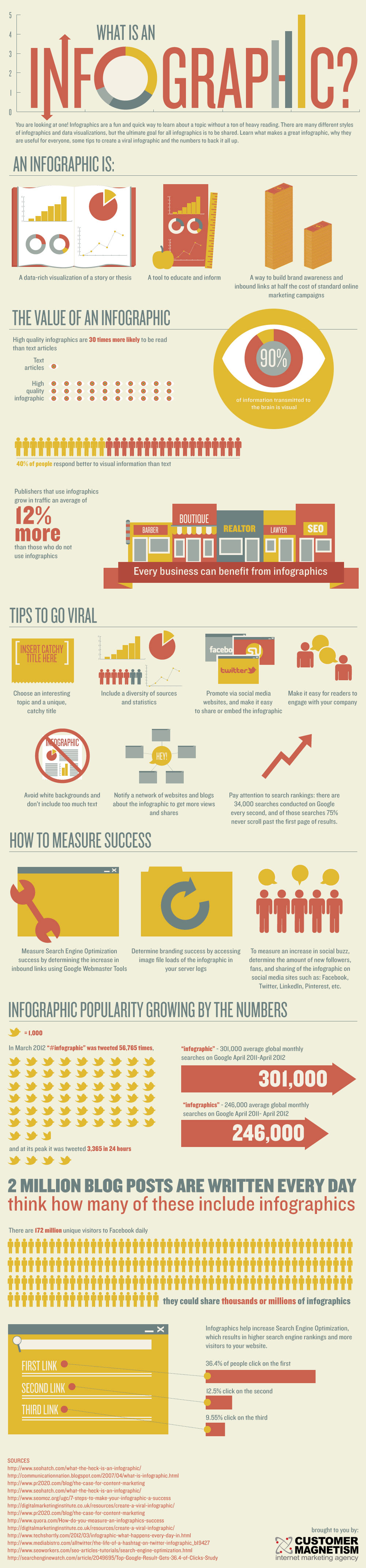
Infographics are amazing. They are a fast and easy way to convey a large amount of information quickly and succinctly, as you can see by this, you guessed it, an infographic explaining infographics. Which by the way, useful as it is, I'm not including it as one of my three incredible infographics because it's not new.

What is an Infographic?
Created by Customer Magnetism, an award winning Digital Marketing Agency.

I wrote a blog post last year, Infographics: The Graphic Visual Explosion, and if anything, I'd say infographics have become even more popular in the last nine months.

Here are three of the most incredible infographics I've seen pass through my feeds this week, and I can't help but share the wealth; something most social media practitioners seem almost supernaturally compelled to do. (Hmmm, I think there's a blog post here.... every time I see an amazing article, image or infographic I immediately start mentally crafting my tweet or Facebook post about it.)

I can't decide which of these is my favorite, so I'd love to hear which one you like the best.

This first one, designed by Marketo, which shows us some of the numbers associated with cat and bacon searches, is utterly brilliant. Social Media Today has a great article, Why Marketing That Includes Cats and Bacon Is the Cat’s Meow, that actually suggests some ways you can integrate these popular cat and bacon memes into your small business marketing plan.


The second one, created by eBay Deals, illustrates 16 examples of viral philanthropy, via crowdfunding sites such as indiegogo.com, giveforward.com and gofundme.com, and even reddit, for the victims of natural disasters such as earthquakes and hurricanes, victims of large-scale shootings, and others who have pulled some heartstrings.

This is a screenshot of the top of a very long and narrow infographic.Click on the link above to see it all.

The final one in my trifecta of favorites is Every Second on the Internet, a brilliant and interactive infographic from designly.com showing, in real-time visuals, how much data is streaming through the Internet every single second. You have to see it in action — this still shot doesn't begin to do it justice.

This also is just a screenshot of a tiny part of the entire piece. Click on the link aboveto see it all.


This is just the beginning, and we'll continue to see great strides in function and creativity. Infographics do not translate well to mobile, nor are the majority of them, including these, accessible in their current form to people with visual disabilities.

The Latest in Accessibility News from TED

If you've been following my blog for a while, you'll know that I'm a passionate advocate of accessibility, having worked in the field for over 10 years, and a strong proponent of the power of TED, just this year joining the core team for my local TEDxSanJoseCA and managing its social media presence.

I'm still blown away by the outstanding quality of everything TED does. The range of topics is vast and cutting edge. Videos are captioned for people who are hearing impaired, English-as-a-second-language learners, or temporarily disabled (in an airport or coffee shop where the sound can't be heard). TED Talks are always 18 minutes or less, and I learn something new and amazing from every single one. My only complaint is that I can't keep up with all of the amazing content TED uncovers and shares.

TED is continuing their reputation for excellence and expanding the theme of "Riveting talks by remarkable people, free to the world", with these wonderful essays, blogs, and talks on blindness and vision.

Fittle: An accessible learning toolset for visually challenged kids  


The shape of things: Fellows Friday with Anthony Vipin Das, on FITTLE, a toy that helps blind children read includes an essay written by TED Senior Fellow Dr. Anthony Vipin Das, an ophthalmologist who is working with Tania Jain, a designer from National Institute of Design, Gandhinagar, on FITTLE, a toy to help blind children learn to read Braille while getting a sense of the shape of the world around them.


As Dr. Vipin Das says in his essay, "This new toy, which we call FITTLE (“fit the puzzle”), helps children learn individual letters of Braille, construct words, and understand the form of objects, all through a playful game. Essentially, we are changing the way that blind children at a young age are going to perceive the world around them."

"We wish to help spread this idea as far and wide as possible. With current technology, FITTLE can be downloaded through open-source platforms and the pieces can be 3D printed by anyone who wishes to do so."

 A TED Celebration with a Playlist of Talks on Blindness and Sight


The second TED feature that made me sit up and pay attention was a blog post, The second amazing Looking into the future: A stem cell development to cure blindness, plus a playlist of visionary talks.

It references a BBC report, 'Big leap' towards curing blindness in stem cell study, that reveals how a research team in the UK has created a technique to transform stem cells into photoreceptors and inject them into the eyes of mice.

The TED blog then shares a playlist of TED talks on blindness and sight, including:
  • Pawan Sinha on how brains learn to see
  • Dennis Hong: Making a car for blind drivers
  • Sheila Nirenberg: A prosthetic eye to treat blindness
  • Neil Harbisson: I listen to color
  • Beau Lotto: Optical illusions show how we see 
Once again, TED lives up to its tagline "Ideas worth spreading".

Think Before You Post: Your Digital Footprint Lives Forever

It's safe to say that 10 years ago no one knew what a digital footprint was, or that everyone who is online has one. Today, of course, it's a very different story, and like many emerging technologies, there are potentially and previously unknown positive and negative results from using the technology — in this case sharing your life online with friends, family, and the world.

The upside?
You create and control the online image or persona that you present to the world.

The downside?
You create and control the online image or persona that you present to the world.

In a recent Mashable article, 1 in 4 Young Adults Regret Social Media Posts, Survey Says:

 Legal-information website FindLaw.com conducted a "demographically balanced" survey among 1,000 American adults, asking them questions about their behavior surrounding Twitter, Facebook, Instagram, Pinterest, Tumblr and other popular social platforms. Among younger adults aged 18 to 34, 29% said they have posted a photo, comment or other personal information they fear could compromise their current or future job prospects.

It's not an irrational fear.

An article on examiner.com, Current and potential employers are looking at your social media pages, points out:

A survey of more than 2000 hiring managers and HR professionals conducted by Harris Interactive on behalf of CareerBuilder in February of 2012 found that 37% or nearly two in five employers check social media when looking at a potential employee. An additional 11% stated they would like to begin using social media to screen new employees. 

If you google "people who've lost their jobs due to social media mistakes", you'll see quite a few examples, such as:
  • In March 2009, a 22 year old thoughtlessly tweeted about a job offer from Cisco.
    "Cisco just offered me a job! Now I have to weight the utility of a fatty paycheck against the daily commute to San Jose and hating the work."
    Cisco employees saw her tweet, and shared it with her hiring manager. The job offer was withdrawn. Her tweet, and the entire story, went viral.
  • Matt Watson lost his job at All City Coffee in Washington, DC after he was outed as the voice behind the sarcastic and snarky comments on the blog The Bitter Barista.
  • There have been multiple reports of teachers in conservative school districts who have lost their jobs after posting "private" photos of themselves on Facebook drinking alcohol,  smoking, or posing in revealing lingerie.
As the millennials move into positions of power, everyone will be more digital-savvy and the stigma of a less-than-stellar digital footprint will begin to fade. But until that time, and because the Internet is forever and nothing is truly "private", here are three easy rules to keep yourself out of trouble:
  1. If in doubt, don't post it. This goes for your Facebook posts, tweets, Instagram photos, reddit or tumblr accounts, and comments on articles and blogs.
  2. If you would be embarrassed if your grandmother or second-line manager saw it, don't post it.
  3. Enable the Facebook photo tagging permission so that your "friends" can't tag you without your approval.
The good news? You control your digital footprint, and can put your best foot forward, digitally speaking.

Image courtesy of Simon Howden/FreeDigitalPhotos.net